 Download
Introducing Safer to your child
Why it helps to tell your child what Safer does and why you installed it, even if their limits have already started.
Safer puts limits on your child's iPhone or iPad which help them build healthy habits - but limits they didn't have yesterday can come as an unwelcome surprise. They will find out either way, so it's better they hear it from you, and this article is about how.
Tom's recommendation
Talk to your child about Safer today, before the next limit kicks in, and go through their limits together. You can change them from your phone, so if any of their suggestions are reasonable, adjust one or two.
How to do it
Explain what Safer does and why. If they've already hit a limit, it isn't too late. Pick a calm moment, say which limits you've set and why, and ask if they have questions. Keep it short and true, and make it a conversation, not a lecture.
A long talk about limits can feel critical, so ask what they think and listen to the answer. Something like: "I've set up an app called Safer on your iPhone. It gives you a set amount of time each day, and turns most apps off at bedtime and during school. It's to help you sleep well and have time for other things. It can't see what you do or read your messages. What do you think? Any questions?"
Tip: I have found that a conversation like this goes better on a walk together than sitting at a table at home.
Show them Safer on their iPhone or iPad. Open Safer on their device together. The top card shows how much time they've used today across all their devices. Under Screentime Rules, tap the strip to see when each limit applies. Tell them that when they hit a limit, an Ask for more time button appears and the request comes to your phone. Do this with each child who has their own device.
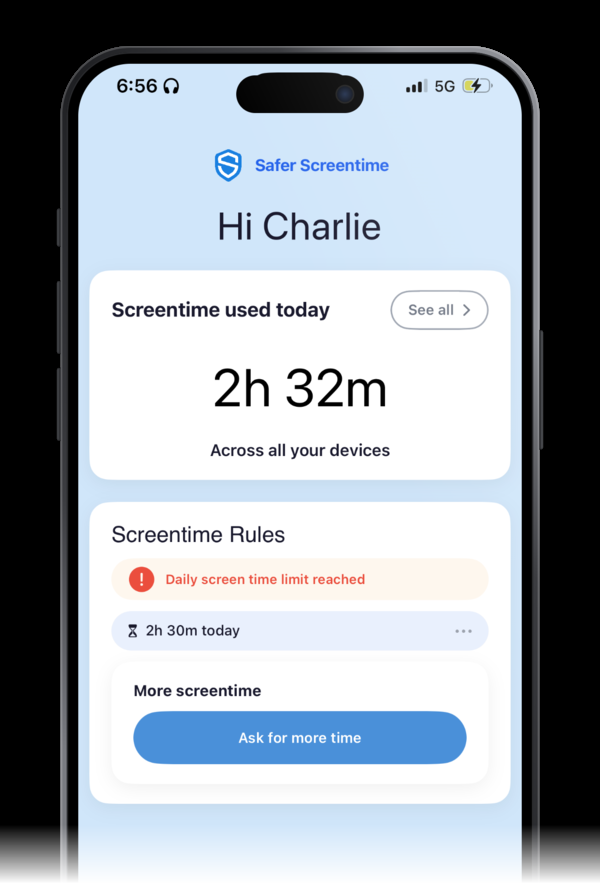
Expect some pushback, and stay consistent. Disagreement is normal, and a first week with some grumbling in it doesn't mean the talk failed. Let them say they're annoyed, then hold the limits you set. Following through matters more than winning the argument.
Check in after a week. Ask how it's going for everyone, not just them, and make a few tweaks until it feels right. Tell them the rules can change by agreement: asking calmly works better than arguing. Teenagers might not thank you at first.
Keep talking. Safer backs up the conversation, it doesn't replace it. No parental control tool is 100% effective, so keep the talk going and keep revisiting the rules as your child grows.
What the experts say
Research I found on the topic of having a conversation with your children is mostly advice from regulators, charities and paediatricians. Here are some links that have more details if you are interested.
- Explain the controls and why. Australia, eSafety Commissioner, Parental controls (updated 10 September 2026). "At least discuss the parental controls you plan to use, and why – and ask them if they have any questions." Also: "No parental control tool is 100% effective."
- Expect pushback. US, American Academy of Pediatrics, Parental Controls: Setting Safe & Healthy Media Limits (HealthyChildren.org, 22 January 2024). "Don't be surprised if your child disagrees... Staying consistent and following through are key."
- Agree the rules together. UK, Chief Medical Officers, advice for parents and carers (7 February 2019). "We encourage parents and carers to agree boundaries... with [children and young people] around online behaviours and time spent using screens."
- Check in after a week. Australia, ReachOut Parents, Managing your family's screen time (7 September 2023). "After a week of following the new rules, check in and see how it's going for everyone." Teenagers "might not thank you at first".
A note from Tom
I introduced Safer to my children in two different situations.
My older son already had a phone and was starting high school. We told him we had installed Safer and why it mattered. He was unhappy and told us so. We explained the reasons consistently every time he brought it up, and after a week or so he began to accept it.
With my younger son, we installed Safer on his iPad before he got a phone. He didn't challenge us, and while he didn't love it, he always accepted it when he ran out of time.
In my experience, taking away time they already had is much harder than never giving it, which is why it helps to talk about it straight away and set limits early.