 Download
Add your child's existing Apple Account to your family
Use this page if your child already has an Apple Account and you want to add it to your Family Sharing group instead of creating a new one.
You can invite an adult, or a child who already has a Child Account, to your Family Sharing group. If your child's account is a Child Account, this is the way to get it into your group.
-
On your iPhone
Open Settings, tap Family, then tap the Add Member button (top right) and Invite Others. Enter your child's Apple Account.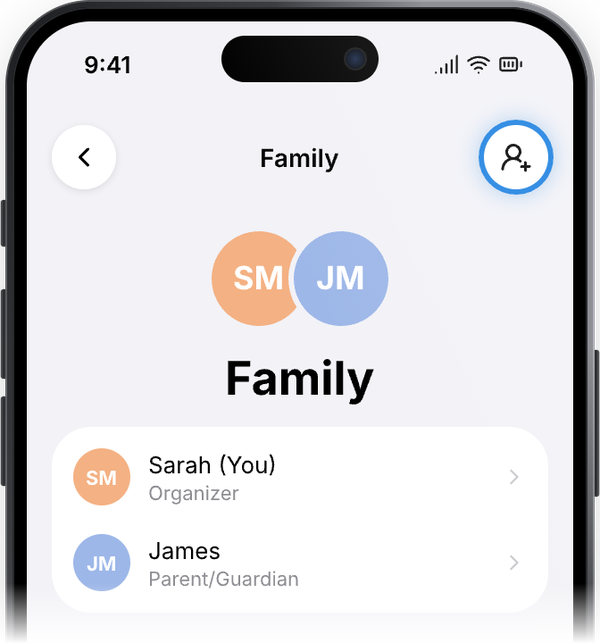
-
On your child's iPhone or iPad
Open Settings, tap their name, then Invitations, and accept. They may need to enter their password. They can also accept from the invitation message or email. -
On your iPhone
Check Settings, then Family. Your child should be listed.
If it doesn't work
- Your child shows as an adult after joining, or the invitation doesn't offer them as a child.
The account may not be a Child Account. See my child's Apple Account shows as an adult. - Your child is in another family's group.
A person can be in only one Family Sharing group at a time. See move your child to your Family Sharing group.
Next
Make sure your child's iPhone or iPad is signed in to this account: sign your child's device in to their Apple Account.
Source: Apple Support, Set up Family Sharing.
 The Safer Screentime app checks the screentime setup on your phone (parent or child) and guides you through the steps to fix any issues.